Showing posts with label iphone app. Show all posts

Friday, February 8, 2013

Why Us Us?

App Mockup Tools works with Apple Keynote

Apple Keynote is a well known, easy to learn and use presentation application.
You can create beautiful prototypes in minutes. It is so convincing you will swear Apple designed their iOS UI elements with it.
iPhone Keynote | App Mockup Tools


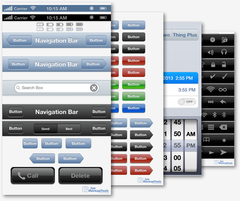
iPhone GUI Kit | App Mockup Tools 


Save Time and Money With Pre-Designed Kits

Our iOS GUI Element Kits get you up and running quickly. No need to design
each element. The most commonly used elements are included in the kit.
Buy once, play forever. No monthly fees as with other services.


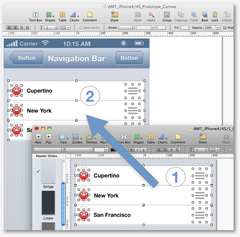
Simple Easy App Prototyping No Coding Required

By simply copy and pasting you can create stunning prototypes without
knowing a line of code. Its that easy. Copy, paste, align, hyperlink to next slide.
iPhone Prototype | App Mockup Tools


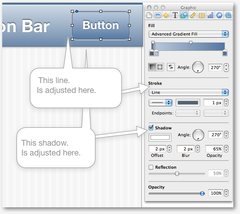
Edit iOS GUI Elements | App Mockup Tools


Customizable Editable Elements

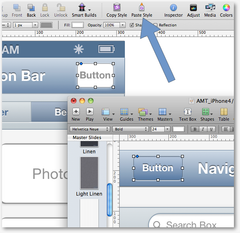
Each element in our kits are fully customizable. Edit color, stroke, shadow,
shape, typeface and more all with a click or two. Copy classic Apple elements
exactly or customize your own.


Change from Wireframe to Prototype in Minutes

By copy and pasting styles you can change from wireframe to high-fidelity
prototype in minutes. Gone are the days of redesigning prototypes.
iPhone Wireframe\Prototype | App Mockup Tools


App Prototype Collaborate | App Mockup Tools 


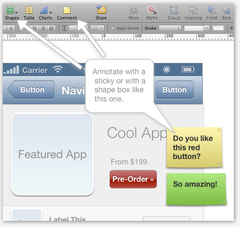
Annotate Share Collaborate with Clients Coworkers and Developers

App Mockup Tools prototypes can be shared easily at any time.
Share via email, Youtube, Dropbox, iCloud, etc. Leave comments on stickies
or box shapes. Your clients can test your app and give feed back accordingly.


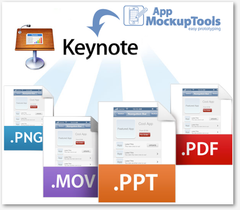
Export as PNG, TIFF, PDF, KEY, PPT

Export your slides as PNG's or TIFF's for final production in Fireworks
or other editing/design software. And clickable PDF's can be viewed on mobile
devices for viewing.
Keynote Prototype export | App Mockup Tools 


iPhone GUI Kit | App Mockup Tools


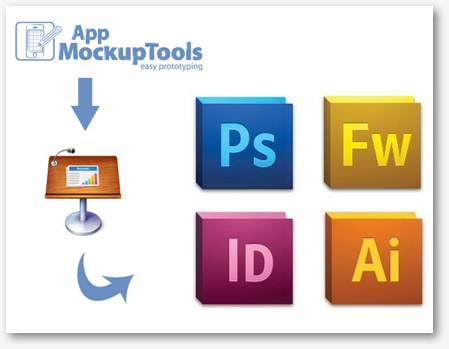
Copy and Paste to your Favorite Design Application

App Mockup Tools prototypes can easily by copied to your favorite design application. Just copy and paste. Save time and look good!


More info at the main site www.appmockuptools.com

Tuesday, September 18, 2012

Getting Started Building iPhone Apps in Xcode 4.2 - Speckyboy Design Magazine

The newest version of Xcode comes packaged with a few noticeable interface changes. For beginners and intermediate users it can be difficult figuring out even the most basic functionality. And although Apple’s online documentation is well-written, it’s certainly not friendly for the average user.

So in this guide I’d like to put together some basic steps for building any iOS app. I’ll be focusing exclusively on iPhone & iPod Touch devices since iPad opens up a whole new chapter of research. You aren’t required to understand Objective-C or MVC programming to get started with this Xcode guide. But any dedicated iOS app developer will study at least some basic syntax guidelines.

If you are not employed as an app developer your time might be better spent just prototyping your app with Keynote and a set of iOS GUI elements: http://www.appmockuptools.com/collections/types?q=iOS+GUI+Elements and then send that to Elance or oDesk for a developer to finish.

Friday, September 14, 2012

Xcode and Objective C Classes for the Ambitious

Here’s an overview of this 3-day (at your own pace), class:

  • Pre-Class (before class)
  • Xcode: Editor tools and tips
  • Introduction to Objective-C: Selectors and Memory
  • Introduction to Objective C: Classes
  • Introduction to Objective C: Foundation
  • Memory Management
  • Application and View Life Cycle
  • Tables
  • Navigation
  • Gestures
  • Core Data
  • Human Interface Guidelines and Device Setup
  • Registering as an Apple Developer
  • Run App on Device
  • Individual App Project: Start to Finish
  • Submitting App to Apple

For those that dont want to learn code you can use Apple Keynote along with some pre-designed and fully-editable set of iOS GUI Elements: http://www.appmockuptools.com/collections/types?q=iOS+GUI+Elements

How to Make an iPhone App (For Non-Technical People)

There is just one tiny problem – you don’t know how to program, let alone make an iPhone app.

Using Keynote is an excellent way to make an iPhone prototype. You can speed it up by using pre-designed fully-editable iOS GUI Element Kits with contain the most used buttons, sliders etc: http://www.appmockuptools.com/collections/types?q=iOS+GUI+Elements