Friday, February 8, 2013

Why Us Us?

App Mockup Tools works with Apple Keynote

Apple Keynote is a well known, easy to learn and use presentation application.
You can create beautiful prototypes in minutes. It is so convincing you will swear Apple designed their iOS UI elements with it.
iPhone Keynote | App Mockup Tools


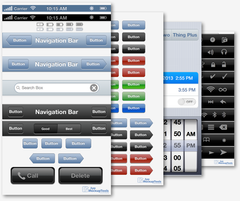
iPhone GUI Kit | App Mockup Tools 


Save Time and Money With Pre-Designed Kits

Our iOS GUI Element Kits get you up and running quickly. No need to design
each element. The most commonly used elements are included in the kit.
Buy once, play forever. No monthly fees as with other services.


Simple Easy App Prototyping No Coding Required

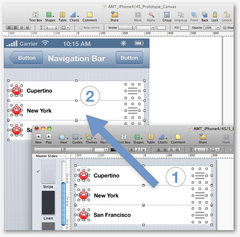
By simply copy and pasting you can create stunning prototypes without
knowing a line of code. Its that easy. Copy, paste, align, hyperlink to next slide.
iPhone Prototype | App Mockup Tools


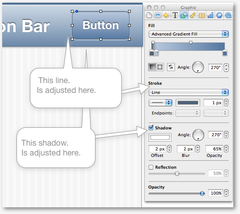
Edit iOS GUI Elements | App Mockup Tools


Customizable Editable Elements

Each element in our kits are fully customizable. Edit color, stroke, shadow,
shape, typeface and more all with a click or two. Copy classic Apple elements
exactly or customize your own.


Change from Wireframe to Prototype in Minutes

By copy and pasting styles you can change from wireframe to high-fidelity
prototype in minutes. Gone are the days of redesigning prototypes.
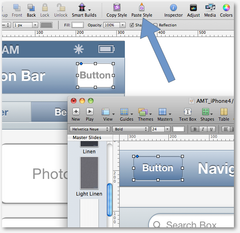
iPhone Wireframe\Prototype | App Mockup Tools


App Prototype Collaborate | App Mockup Tools 


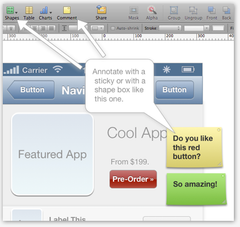
Annotate Share Collaborate with Clients Coworkers and Developers

App Mockup Tools prototypes can be shared easily at any time.
Share via email, Youtube, Dropbox, iCloud, etc. Leave comments on stickies
or box shapes. Your clients can test your app and give feed back accordingly.


Export as PNG, TIFF, PDF, KEY, PPT

Export your slides as PNG's or TIFF's for final production in Fireworks
or other editing/design software. And clickable PDF's can be viewed on mobile
devices for viewing.
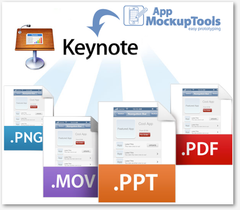
Keynote Prototype export | App Mockup Tools 


iPhone GUI Kit | App Mockup Tools


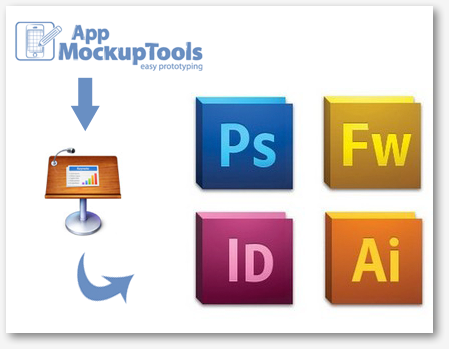
Copy and Paste to your Favorite Design Application

App Mockup Tools prototypes can easily by copied to your favorite design application. Just copy and paste. Save time and look good!


More info at the main site www.appmockuptools.com

Tuesday, February 5, 2013

iPhone 5 Screen and GUI Element Dimensions | App Mockup Tools

iPhone 5 Screen and GUI Element Dimensions

Posted on February 05, 2013 by John Abernathy
 Here are some screen dimensions and iOS GUI element dimensions for the iPhone 5. There didn't seem to be one clear source so I made one. I'll add iPhone 4S and iPad later. I hope you find it useful.

iPhone 5 Sreen and GUI Element Dimensions | App Mockup Tools

And here is a chart that lists all of the iPhone 5 dimensions out including Nav bar, Tab bar and Tool bar, buttons and icons.


iPhone 5 Sreen and GUI Element Dimensions | App Mockup Tools

Monday, February 4, 2013

Just Released iPhone iOS GUI Element Kit in App Prototyping

iPhone iOS GUI Element Kit - App Prototyping


App Mockup Tools has released  our iPhone iOS GUI Element Kit - App Prototyping. It is an iOS GUI element kit filled with buttons, sliders, dials, keyboards, backgrounds, bars, lists, selectors icons, etc. All completely editable. Edit type, color, shadowing, size, etc. Quickly, easily create click-able interactive app prototypes. You can also share and annotate your app prototypes with clients and coworkers. Works with Keynote as an excellent app wireframing Tool! For iPhone 4/4S and 5.

iOS GUI Element Kit - Directions


Our iOS GUI Element Kits include simple directions to get you started. Apple's Keynote is an easy to use, easy to learn applications that is excellent for prototyping apps. You would swear Apple used it to create the commonly used app GUI elements. Its easy to start by opening your library and canvas files. Simply select an element from the library and copy and paste it into your canvas. Add slide pages and hyperlink them together to simulate a real app experience. You can change from portrait to landscape in the slide inspector window. Let us know if there are elements that you think should be included.

Wednesday, November 14, 2012

App Sketchpads in European Paper Sizes

App Mockup Tools have just released our App Sketchpads in European paper sizes in response to your requests. Now all of our iPhone and iPad sketchpads are available either in 4X6/A6 or 8.5X11/A4 paper sizes. App Sketchpads can be used as a rapid way to get your app concepts worked out prior to prototyping. It is the quickest, easiest and cheapest way to start the app developing process. By getting your ideas strait prior to wireframing or prototyping you save time and expense later. Happy sketching!


Wednesday, October 3, 2012

iPhone iOS GUI Elements Kit - Wireframe | App Mockup Tools

iPhone iOS GUI Elements Kit - Wireframe

$25.00

 Now Available!

An iOS GUI element kit filled with buttons, sliders, dials, keyboards, background, bars, etc. All completely editable. Edit type, color, shadowing, size, etc. Quickly, easily create click-able interactive mockups. Share and annotate your mockups. Work with Keynote as an excellent app wireframing Tool!
  • Hundreds of wireframe GUI elements
  • Shown above are 6 of 34 pages
  • Works with Keynote
  • Easy directions
  • Completely editable
  • Interactive, click-able
  • Quick and easy to use
Pin It Fancy

I released the iPhone iOS GUI Element Kit in Wireframe format today.

Tuesday, October 2, 2012

App prototyping with Keynote | Indie Dev Stories

  • Keynote is very easy to use
  • Everybody knows it and knows how it works. Nobody is afraid of Keynote ;)
  • It allows me to prototype with very simplistic wireframe shapes
  • It allows for side notes and examples to clarify some issues about the app screens
  • Its very easy to share with non-technical people
  • You can visualize the same mockup on the Mac and on the iPad in Keynote format
  • You can export it as PDF and visualize it universally
  • More good reasons why Keynote is an excellent Application for app prototyping.

    Thursday, September 27, 2012

    5 Steps for Wireframing and Paper Prototyping Mobile Apps

    Paper Prototyping Comes First

     In my experience, there is a vast difference in the form and function of wireframes versus paper prototypes, even though the terms may be used interchangeably. In my mobile design process, the first thing that happens after we figure out who is using the app and how, is paper prototypes -NOT wireframes.

    Wireframes Come Second and Must be Shared

     Even if this is an app for your own internal “client”, wireframes serve as another review to make sure the app is working in a way that serves both the user and the business. You could skip the process and move straight from paper prototypes to Photoshop for GUI design. I know it’s tempting, but don’t do it! The instant you begin working in a bubble is the same time you give in to the “Curse of Knowledge”.
    From paper to prototype products available: http://www.appmockuptools.com

    Wednesday, September 26, 2012

    Keynote as a collaborative wireframing tool

    Looking for a quick and dirty solution

    In many ways, wireframing by yourself is much easier. You have time to think, tweak and refine. This is hard to do with a client in the room. Collaborative wireframing is about quickly mocking up ideas and discussing them. So, you need a tool that facilitates that goal.

    Your wireframing tool needs to be:

    • Quick to use
      Nothing’s worse than a client sitting around as you desperately battle with a wireframing tool to demonstrate an idea.
    • Easy to revise
      In a collaborative process, the discussion will lead you to try out loads of subtly different approaches. You will have to be able to alter the wireframe quickly.
    • Easy to understand
      Wireframes have to be clear and descriptive. Clients don’t have the benefit of our experience in working with wireframes and so can be easily confused.
    • Professional-looking
      An idea can be cheapened by the presentation. It helps if the tool can produce a wireframe that looks like a well-considered, high-quality solution.

    Keynote works on all counts here. Especially when you start with pre-designed iOS GUI Element Kits: http://www.appmockuptools.com/collections/types?q=iOS+GUI+Elements

    Tuesday, September 25, 2012

    Monday, September 24, 2012

    GestureWorks Multitouch Software Framework - Build Gesture-Driven Apps

    GestureWorks® 3 is the most advanced multitouch framework ever built.
    Author amazing apps with the new Gesture Markup Language.

    For creating intense gesture driven apps.

    100 Terrific Tools for Coders & Developers | DailyTekk

    Whether you are a world-class programmer looking for a few extra tools to add to your already awesome arsenal or a wanna-be coder looking to get into the game, these coding resources comprised of many startups (meaning you probably haven’t heard of a lot of these) as well as established sites and services are sure to help you take your game to the next level (whatever that might be). Included here are tools to help you communicate better with your team, share code, test your app and track usage, add functionality and much more. Whether you are a mobile or web app developer, I’m sure you will find something new to love here. Any suggestions on great sites or services that should be added?

    What an amazing list of coding resources!

    Friday, September 21, 2012

    25 Impressive and Fantastic Icon Sets for Your iPhone | TutorialChip

    Here, we have collected 25 best and free high-quality iPhone icons set. We hope you’ll like these listed icons, and try to replace your iPhone icons. please tell me which one is your favourite, via our comments section.

    Nice set of iPhone Icons!

    Tuesday, September 18, 2012

    Getting Started Building iPhone Apps in Xcode 4.2 - Speckyboy Design Magazine

    The newest version of Xcode comes packaged with a few noticeable interface changes. For beginners and intermediate users it can be difficult figuring out even the most basic functionality. And although Apple’s online documentation is well-written, it’s certainly not friendly for the average user.

    So in this guide I’d like to put together some basic steps for building any iOS app. I’ll be focusing exclusively on iPhone & iPod Touch devices since iPad opens up a whole new chapter of research. You aren’t required to understand Objective-C or MVC programming to get started with this Xcode guide. But any dedicated iOS app developer will study at least some basic syntax guidelines.

    If you are not employed as an app developer your time might be better spent just prototyping your app with Keynote and a set of iOS GUI elements: http://www.appmockuptools.com/collections/types?q=iOS+GUI+Elements and then send that to Elance or oDesk for a developer to finish.

    Friday, September 14, 2012

    Introduction to iPhone Design

    Are you a web designer, excited by the idea of designing iPhone apps, but unsure of how to get started? Or perhaps you’ve designed a couple of apps, but are looking to boost your skills with some fundamental knowledge of why we make certain design decisions for mobile? This series is for both novice and intermediate-level designers who want to make a big splash in the mobile design space!

    iPhone Design 101 from Mobile Tuts

    The topics you can look forward to in this series include both hands-on techniques and examples as well as mobile related design theory. The following is a line-up of what we will cover over the course of this series:

    • Designing for the iPhone Audience and the App Store
    • How to Use iPhone and iPad Design Templates
    • Designing Apps that Use All Available iPhone Functionality
    • How to Design for the Different Types of iPhone Apps
    • The Mobile Design Process
    • The Pros and Cons of Using Apple Default vs. Custom Graphics
    • Understanding Your App’s Target Audience
    • Icon Design Tips for iPhone and iPad
    • iPhone Mockup Tools and the Wireframing Process
    • Creating Screenshots and Icons for iTunes

    Envtos work is alwaye excellent.

    Prototype steps of GUI development

    First I would design (on paper!) my GUI and all layout to get a feeling for my requirements. If the GUI mostly consist of buttons, labels and some few fields to enter text, I would go for something that it lightweight. In most games I developed there were only a few widget types that I really needed, so for a list like "buttons, labels, windows, listboxes, textboxes and images" a library

    Spending some time clarifying your vision on paper saves time in the long run.

    Xcode and Objective C Classes for the Ambitious

    Here’s an overview of this 3-day (at your own pace), class:

    • Pre-Class (before class)
    • Xcode: Editor tools and tips
    • Introduction to Objective-C: Selectors and Memory
    • Introduction to Objective C: Classes
    • Introduction to Objective C: Foundation
    • Memory Management
    • Application and View Life Cycle
    • Tables
    • Navigation
    • Gestures
    • Core Data
    • Human Interface Guidelines and Device Setup
    • Registering as an Apple Developer
    • Run App on Device
    • Individual App Project: Start to Finish
    • Submitting App to Apple

    For those that dont want to learn code you can use Apple Keynote along with some pre-designed and fully-editable set of iOS GUI Elements: http://www.appmockuptools.com/collections/types?q=iOS+GUI+Elements

    How to Make an iPhone App (For Non-Technical People)

    There is just one tiny problem – you don’t know how to program, let alone make an iPhone app.

    Using Keynote is an excellent way to make an iPhone prototype. You can speed it up by using pre-designed fully-editable iOS GUI Element Kits with contain the most used buttons, sliders etc: http://www.appmockuptools.com/collections/types?q=iOS+GUI+Elements